Configuration to be done for Activation of WCF Service

November 14, 2017
The below configuation to be added in the web.config or app.config for the proper functioning of WCF Service.


 <system.serviceModel>
    <behaviors>
      <serviceBehaviors>
        <behavior name="Service1_Behavior">
          <serviceMetadata httpGetEnabled="True"/>
        </behavior>
      </serviceBehaviors>
    </behaviors>
    <services>
      <service name="Namespace1.Service1"
               behaviorConfiguration="Service1_Behavior">
        <endpoint address="url of wcf service created" binding="basicHttpBinding" contract="Namespace1.IService1"/>
        <endpoint address="mex" binding="mexHttpBinding" contract="IMetadataExchange"/>
      </service>
    </services>
  </system.serviceModel>
 

Generating Unique ID in C# - Best Method.

November 10, 2017

We can use DateTime.Now.Ticks and Guid.NewGuid().ToString() to combine together and make a unique id.

As the DateTime.Now.Ticks is added, we can find out the Date and Time in seconds at which the unique id is created.

Please see the code.

var ticks = DateTime.Now.Ticks;
var guid = Guid.NewGuid().ToString();
var uniqueSessionId = ticks.ToString() +'-'+ guid; //guid created by combining ticks and guid

var datetime = new DateTime(ticks);//for checking purpose
var datetimenow = DateTime.Now;    //b...

Continue reading...
 

How to convert a Date to a formatted string in VB.net?

November 10, 2017
Dim timeFormat As String = "yyyy-MM-dd HH:mm:ss"
objBL.date = Convert.ToDateTime(txtDate.Value).ToString(timeFormat)

This can be used globally to convert so many date field in a form.


Continue reading...
 

How can we limit the length of a string to 150 characters?

November 10, 2017

It will be good if your environment support you to use below method.

[StringLength(150)]
public string MyProperty { get; set; }

You have to include the below namespace to use it.

using System.ComponentModel.DataAnnotations;

Continue reading...
 

Could not load file or assembly 'Newtonsoft.Json' or one of its dependencies. Manifest definition does not match the assembly reference

November 10, 2017

You can solve the issue by adding below lines in web.config file.

 <runtime>
    <assemblyBinding xmlns="urn:schemas-microsoft-com:asm.v1">
      <dependentAssembly>
        <assemblyIdentity name="Newtonsoft.Json" publicKeyToken="30ad4fe6b2a6aeed" culture="neutral"/>
        <bindingRedirect oldVersion="0.0.0.0-8.0.0.0" newVersion="8.0.0.0"/>
      </dependentAssembly>
    </assemblyBinding>
  </runtime>

Continue reading...
 

What is the difference between String and string in C#?

November 10, 2017

string is a sequential collection of characters that is used to represent text.

String object is a sequential collection of System.Char objects that represent a string; a System.Char object corresponds to a UTF-16 code unit.

The value of the String object is the content of the sequential collection of System.Char objects, and that value is immutable (that is, it is read-only).

For more information about the immutability of strings, see the Immutability and the StringBuilder class section in ...


Continue reading...
 

Can't access master page properties from content pages

October 24, 2017
You can add the add this on your Content  page 

<%@ MasterType VirtualPath="~/Main.master"%>

and then simply use Master.YourPropertyName in code file or this.Master.YourPropertyName


Continue reading...
 

How to only allow numbers in TextBox control in asp.net

October 14, 2017
You can simply use regular expression validator as

    <asp:TextBox ID="TextBox1" runat="server"></asp:TextBox>
    <asp:RegularExpressionValidator ID="RegularExpressionValidator1"
        ControlToValidate="TextBox1" runat="server"
        ErrorMessage="Only Numbers allowed"
        ValidationExpression="\d+">

    </asp:RegularExpressionValidator>

Also you can use the below regular expression to make the text-field as 12 digit number to be added.(madatory)

    ^[0-9]{12}$

Also you can make the field ...

Continue reading...
 

USB Modem not working on Windows 8 / 8.1

October 12, 2014
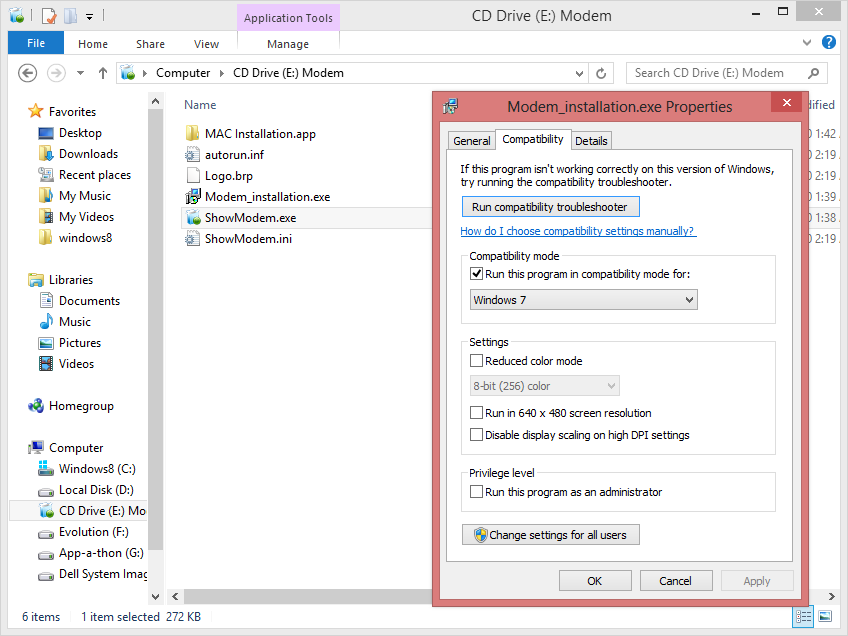
I have windows 8 RTM( Enterprise Edition ) running on Dell inspiron Laptop with Micromax MMX 300G.
well all versions of Micromax MMX modem will work fine.

Just follow the steps below:

Method 1 (Older Method works fine with Windows 8):

1. uninstall the software if already installed.2. open the modem in new windows and set its (modem_installation.exeand show_modem.exe ) compatibility to windows7 then         press OK.
3. Now install the software , then restart the system .
4. Connect the modem and st...


Continue reading...
 

Creating a Bootable Disk / PenDrive

January 8, 2013
1. Insert your formatted USB (4GB+ preferable) stick to the system.
2. Open elevated Command Prompt. To do this, type in CMD in Start menu search field and hit Ctrl + Shift + Enter. Alternatively, navigate to Start > All programs >Accessories > right click on Command Prompt and select run as administrator or open RUN ,type cmd and hit enter.
3. When the Command Prompt opens, enter the following command:
DISKPART and hit enter.
LIST DISK and hit enter.
Once you enter the LIST DISK command, it will ...

Continue reading...
 

Translate This Page


Make a free website with Yola